If needed, you can release a Horizon Cloud tenant organization from your Horizon Partner Admin Console relationship.
Note: The Horizon Partner Admin Console is currently available in Limited Availability (LA) mode only.
-
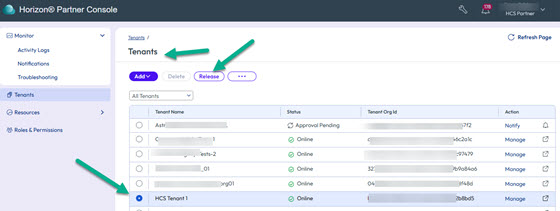
On the Tenants page, select the tenant that you want to release and click Release.
-
On the resultant Release Tenant page, confirm the tenant details. Optionally upload any supporting documentation for this request and then click Submit.
The tenant status changes to Release Pending on the Tenants page in the Partner Admin Console.
When the tenant administrator logs in to their instance of Horizon Cloud, they see the pending release request as a notification (in the upper right area of the Horizon Universal Console) and can then act upon it.
-
To act on the pending request, the tenant administrator opens the Settings page in their Horizon Universal Console (their Horizon Cloud instance) and clicks Manage on the Partner Tenant Management tile.
-
The tenant administrator reviews the release request and clicks Approve. A summary page appears after which the Partner Tenant Management tile is disabled on their Settings page.
Note: If the tenant administrator rejects the release request, the tenant status reflects the rejection and you, as the partner administrator, can either resend or delete the release request.
When the tenant administrator approves the release, the tenant is removed, and no longer visible, on the Tenants page in the Partner Admin Console.
Was this page helpful?