To create a federation between Omnissa Access and AD FS, you configure Omnissa Access as a claims provider (or identity provider) for AD FS.
Prerequisites
- Download the Omnissa Access IdP Metadata
- Verify the federation between AD FS and the application that you want to authenticate through the Omnissa Access service. Verify that AD FS successfully authenticates users logging into the application through a web browser.
Procedure
-
On the AD FS server, run the AD FS Management console as an administrator.
-
(AD FS 3.0) In the left pane, expand the Trust Relationships folder.
-
In the left pane, click Claims Provider Trusts to highlight it. Then right-click Claims Provider Trusts and select Add Claims Provider Trust from the menu.
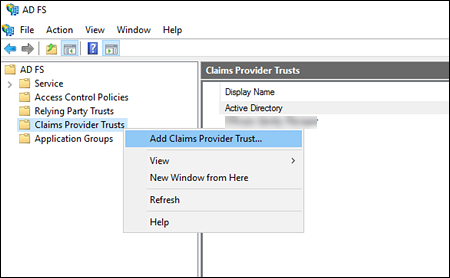
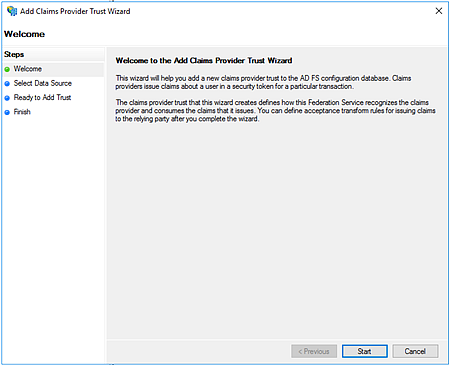
The Add Claims Provider Trust Wizard appears.
-
Click Start.
-
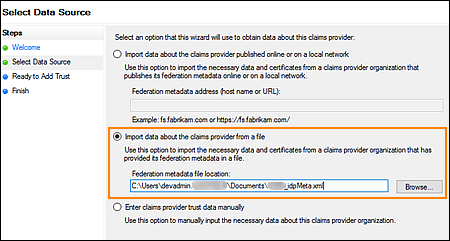
On the Select Data Source page, import the IdP metadata file that you downloaded from Omnissa Access.
-
Select Import data about the claims provider from a file.
-
Click Browse, and navigate to the Omnissa Access IdP metadata file. To import the metadata file, click Open.
-
Then click Next.
-
-
On the Specify Display Name page, in the Display name text box, enter a name for the Omnissa Access relying party. Use a name that is recognizable to users who might need to select Omnissa Access as the authentication option during the login process. Then click Next.
-
On the Ready to Add Trust page, review your changes and then click Next.
-
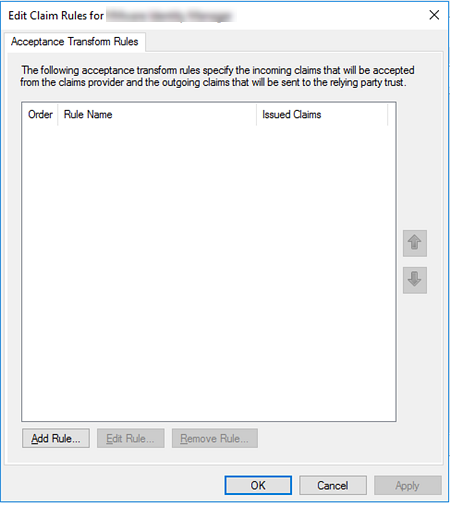
On the Finish page, select the Open the Edit Claim Rules dialog for this claims provider trust when the wizard closes check box. Then click Close.
The Edit Claim Rules window appears.
What to do next
Was this page helpful?