In Omnissa Connect, when an Owner initiates the self-service federation setup for their corporate domain by inviting one or more Enterprise Administrators, the system creates a Management Organization automatically. This organization becomes immediately available to the Owner who started the federation and all Enterprise Administrators invited to complete the setup, and it contains the Enterprise Federation dashboard.
Purpose of the Management Organization
The purpose of the Management Organization is to provide access to the federation setup and to consolidate resource management of member organizations. After completing the initial setup, Enterprise Administrators can access the Enterprise Federation dashboard to modify the federation setup.
How do I access the Enterprise Federation dashboard?
To access the Enterprise Federation dashboard, you must be an Owner or a Member with the Enterprise Administrator role in the Management Organization.
As an Owner of a domain that is currently being federated, you can contact the Owner of the Management Organization and request an access role within the organization.
Procedure
- In the left navigation, go to Identity Management > Enterprise Federation.
- Stay on the Enterprise Federation tab.
- This action takes you to the Enterprise Federation dashboard launching page.
- Select Launch to go to the Enterprise Federation dashboard.
Result
This action navigates you into the Management Organization and the Enterprise Federation dashboard.
How do you access the special Management Organization?
If you already hold an Owner or an Enterprise Administrator access role in the Management Organization, you can switch from your active organization to the Management Organization.
Procedure
- Select the downward arrow next to your user name in the header.
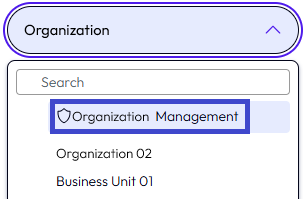
- Select the organization with the shield icon at the beginning and the word
Management.
How can you identify the Management Organization?
To distinguish the Management Organization from other organizations in your enterprise, the organization's display name in Omnissa Connect has a shield icon before your company's name and includes the word Management.
Who can be an Enterprise Administrator?
Any system administrator who belongs to the central security team in your enterprise and manages the directory services and identity providers can be invited as an Enterprise Administrator user.
Setting up enterprise federation might involve representatives of different security teams. As the designated person to set up enterprise federation for your corporate domain, the Enterprise Administrator completes the configuration and validation steps of the self-service setup process. The Enterprise Administrator can also invite other administrators to help with the setup.
Owners who hold system administrator roles with their enterprise and have sufficient knowledge of the enterprise directory service and identity provider configuration can act as Enterprise Administrators for the federation setup.
Enterprise Administrators involved in the setup must have Omnissa Connect accounts with an ID.
Was this page helpful?