Limited Availability
Horizon 8 offers Nutanix integration with limited availability. For more details on the functionality available in this limited availability release, see Horizon 8 Support for Nutanix AHV Limited Availability.
If you are a current Omnissa customer and you would like to request access to this feature, contact your sales representative or partner. If you are not a current Omnissa customer and you would like to request access to this feature, contact getHorizon8NutanixLA@omnissa.com.Ensure that you have installed the connection server prior to completing this procedure.
This procedure explains how to connect Horizon 8 to your Nutanix Prism Central server, allowing your Nutanix infrastructure to be used as a capacity provider for running Horizon automated pools.
Add a Capacity Provider in Horizon Console
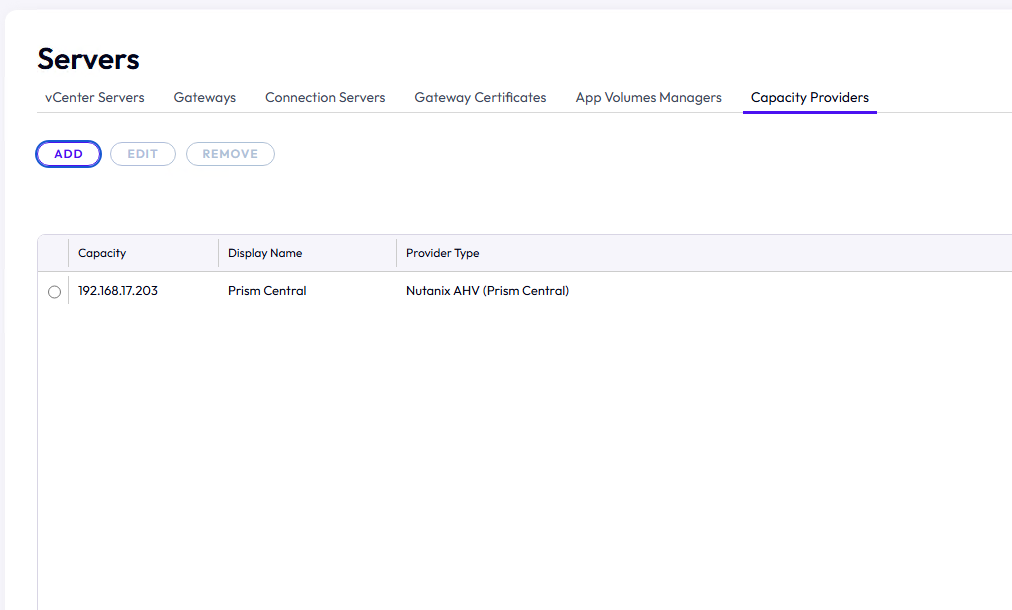
-
Go to Settings > Server > Capacity Providers.
-
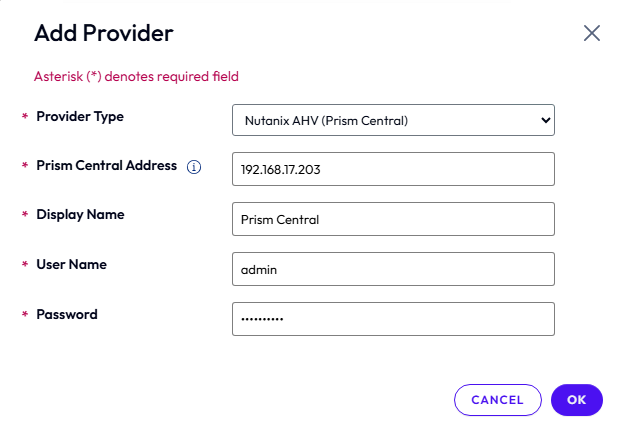
Click Add.
-
Enter your Prism Central FQDN/IP, User Name, and Password.
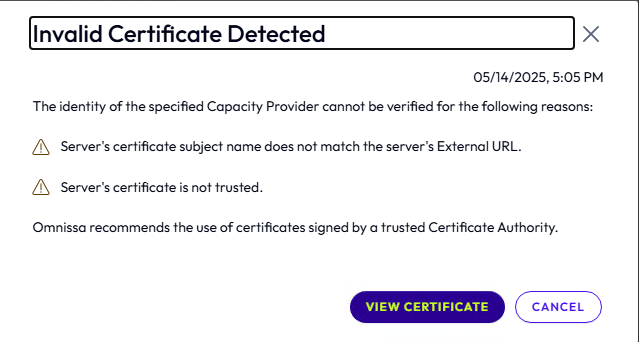
- If a CA-signed cert is not configured on Prism Central, then when prompted, view the certificate details and accept based on the thumbprint after reviewing it. Once added, Prism Central should now appear under your list of Capacity Providers.
Was this page helpful?