Omnissa Access supports single sign-on to Microsoft Office 365 applications, launched either from Microsoft Entra Hybrid domain-joined Horizon desktops or as Horizon published apps, using certificate-based authentication. This feature provides support for Horizon True SSO configurations, which use certificate-based authentication.
In a True SSO flow, after the user authenticates to Omnissa Access, Horizon requests a user certificate from a Microsoft Certificate Authority (CA). This certificate is used to authenticate the user when they launch Office 365 applications, either as published apps or from within a Horizon desktop session, so that they do not need to enter their credentials again. Omnissa Access validates the user certificate against a trusted issuer certificate.
To enable this feature, you must upload the issuer certificate to the Office 365 application configuration in Omnissa Access. The issuer certificate is the Microsoft CA certificate that is used to sign the user certificates.
Prerequisites
- The Office 365 web application is configured in Omnissa Access to allow federated authentication with Omnissa Access as the identity provider.
- Users that have entitlements to Office 365 applications in Horizon must also be entitled to the Office 365 application in Omnissa Access to be able to launch the applications through Horizon.
- True SSO is configured in Horizon.
For Horizon Cloud, see Horizon Cloud True SSO Requirements for Microsoft Enterprise Certificate Authority and Required Certificate Templates for information.
For Horizon on-premises, see Setting up True SSO for information. - In user certificates, the Subject Alternative Name (SAN) field includes the User Principal Name (UPN) attribute.
Procedure
-
In the Omnissa Access console, navigate to Resources > Web Apps.
-
Select the Office 365 app and click Edit.
-
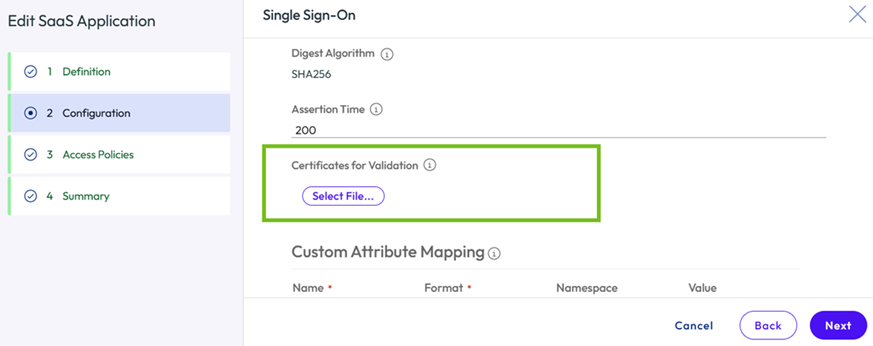
On the Configuration page, expand the Advanced Properties section, and scroll to the Certificates for Validation option.
-
Click Select File and upload the issuer certificate.
Note: Upload a single certificate, not a certificate chain.
-
Save the configuration.
Omnissa Access uses the uploaded issuer certificate to validate user certificates during login.
Was this page helpful?