When an Omnissa Horizon Cloud service has an outage, you can expect the outage to impact your deployment.
You can check the status of Horizon Cloud services at https://status.workspaceone.com.
Careful disaster recovery planning should be considered as part of your Horizon Cloud deployment. For related information, see Providing Disaster Recovery for Horizon and Capacity Providers.
The following diagram provides an overview of how Horizon Cloud can be deployed. The diagram includes some of the key components that make up a deployment and gives a hint of the impact that an outage of specific components might have.
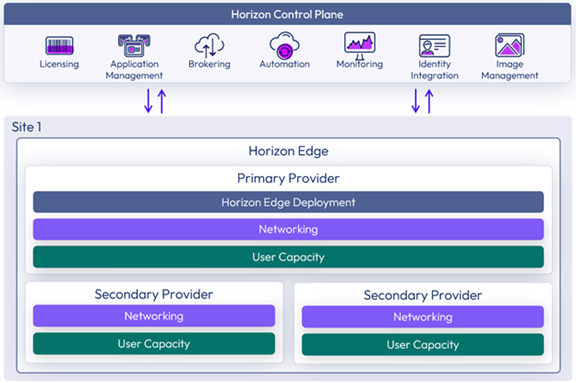
For more information on Horizon Cloud Architecture and its components, refer to Horizon Cloud architecture.
For information on the Omnissa Service Level Agreement (SLA), see Omnissa Service Level Agreement.
The following key outage scenarios provide some details about the potential impact of each type of outage.
Authorization, Management, and Brokering Functionality Outages
Horizon Cloud delivers three key functions to users and administrators: authorization, management, and brokering. If any of these functions is degraded or unavailable, it might indicate an issue with a Horizon Cloud component in a specific region.
Disaster Recovery is a shared responsibility between Omnissa and customers for Horizon Cloud. For related information see, Disaster Recovery shared responsibilities.
| Function | Scope | Recovery |
|---|---|---|
| Authorization | Globally distributed — instances in US, EU, and JP | Automatic — requests reroute to an available region |
| Management | Global — deployment and configuration execute within each region; a regional outage affects that region only | Automatic once regional functionality is restored |
| Brokering | Regional — scoped to the region where resources reside | Requires restoration of regional functionality |
Authorization
Authorization functionality allows end users to sign in with their configured identity provider and view the desktops and applications they are entitled to access. Authorization operates globally, with instances distributed across multiple geographical regions (US, EU, and JP), so that if one region becomes unavailable, requests are automatically handled by another.
If users are experiencing sign-in problems or are unable to view their entitlements, it might indicate that authorization functionality is degraded in a specific region.
- Existing active sessions connected to virtual desktops remain unaffected.
- Horizon Cloud automatically directs new sign-in requests to available functionality in other regions.
- Users can continue signing in and viewing their entitlements as long as authorization functionality is available in at least one region.
Management
Management functionality allows administrators to deploy infrastructure, create and update desktop pools, assign entitlements, and manage resources such as Active Directory (AD), Edge Gateways, Unified Access Gateways (UAGs), and pools. Management operations are scoped to the region where the resources reside. The provisioning capability in each region holds the contextual knowledge needed to deploy and configure infrastructure for its local edges and capacity providers, so these operations cannot be automatically rerouted to another region if that region becomes unavailable.
If administrators are experiencing difficulty deploying resources or making configuration changes in a specific region, it might indicate that the provisioning capability in that region is unavailable.
- Management changes can still be submitted through the Horizon Universal Console and are recorded as the intended state — no resubmission is required.
- Changes that require execution in the affected region — such as provisioning new pools, deploying UAGs, or making infrastructure updates — do not take effect immediately. Those requests are accepted and processed automatically once the provisioning capability in that region is restored.
- Administrators might experience limited ability to manage, monitor, or troubleshoot resources in the affected region until functionality is restored. Management operations in other regions are not affected.
Brokering
Brokering functionality allows users to select an entitlement and connect to their desktop or published application. Brokering functionality operates regionally — each geographical region runs its own brokering capability for the resources located there. Unlike authorization, brokering requests cannot be automatically rerouted to another region if the local brokering capability becomes unavailable.
If users are unable to launch sessions to resources in a specific region, it might indicate that brokering functionality is unavailable in that region.
- Existing active sessions continue unaffected.
- New session launches to resources in the affected region fail until brokering functionality is restored in that region.
- If you have configured floating pool groups with pools in multiple regions, the Horizon Control Plane automatically brokers connections to desktops in available regions.
Capacity Provider Outages
A capacity provider is a supported hypervisor or cloud platform that provides the resource capacity to deliver desktops and applications. An outage to any capacity provider has common impacts.
User access impact:
- Users cannot access their virtual desktops and published applications in the affected provider.
- Active sessions are disconnected.
- New session launches fail.
- Users with resources in other providers retain access.
Administrative impact:
- Cannot provision new desktop pools or RDSH farms.
- Cannot modify existing desktop assignments.
- Other providers remain manageable.
The impact scope and your responsibilities differ based on provider type:
Cloud-Native Providers
The cloud provider manages the underlying infrastructure. You cannot directly control or remediate infrastructure issues. For cloud-native providers, capacity is managed by cloud infrastructure service APIs that provide the ability to manipulate resources on the service.
Infrastructure managed by cloud provider:
- Storage and compute capacity allocation.
- Hardware failures and replacement.
- Networking infrastructure and load balancers.
- Regional datacenter operations.
Your responsibility:
- Architect for multi-region redundancy if high availability is required.
- Monitor consumption and request quota increases when needed.
Data Center Providers (On-Premises)
You are responsible for all infrastructure management and capacity planning. For data center providers, capacity is managed by a hypervisor manager, for example, VMware vCenter, Nutanix Prism, or OpenStack Nova, that provides the ability to manipulate resources on the service.
Infrastructure you must manage:
- Storage performance - degradation causes slow desktop boot times and sluggish application launches.
- Compute capacity - exhaustion blocks new desktop provisioning and pool scaling.
- Hardware failures - you must maintain and replace failed components.
- Network infrastructure - outages disconnect users from resources.
- Disaster recovery - you must implement backup and DR strategies.
- Individual VM failures - you are responsible for maintaining adequate capacity and redundancy.
Cloud PC Providers
Cloud PC providers include Amazon WorkSpaces Core and Microsoft Windows 365. With these providers, the Cloud service manages the virtual desktop service on the customer's behalf. The Horizon Edge Gateway and Unified Access Gateways for these deployments run on the underlying infrastructure service (Amazon EC2 for Amazon WorkSpaces Core, or Microsoft Azure for Windows 365), but the end-user desktop VMs are hosted and managed separately as part of the Cloud PC service itself.
Horizon Edge Gateway and UAG components remain online and fully functional independently of Cloud PC service health, and the Cloud PC service does not depend on Horizon Edge availability.
If the Cloud PC service is degraded or unavailable, either or both of the following might apply:
- The end-user desktop VMs delivered by the Cloud PC service are unreachable or fail to launch, even though the surrounding Horizon Edge infrastructure shows no issue.
- Users cannot access their virtual desktops until the Cloud PC service is restored.
Horizon Edge Gateway Outages
A Horizon Edge is deployed in a specific site within the customer's capacity provider. A Horizon Edge includes the Edge Gateway and Unified Access Gateways, along with scalable compute capacity for images, desktops, and applications, and the internal networking required for all components to communicate.
Horizon Edge Gateway manages and monitors Unified Access Gateways, handles end-user authentication (SSO) with identity providers and Directory Service, and forwards resource monitoring data from Horizon workloads to Omnissa Intelligence. An outage to Horizon Edge Gateway impacts authentication services, monitoring data relay, and management functions.
For more information on Horizon Edge Gateway, see Horizon Edge.
Single Sign-On impact:
- End users lose SSO capability and must manually enter credentials.
- Users experience multiple authentication prompts.
- Impact is limited to the affected Horizon Edge.
Session access:
- Existing active sessions continue without interruption.
- New session launches succeed but require credential entry.
- Protocol traffic continues flowing directly through UAG appliances.
Monitoring and telemetry:
- Monitoring data from the affected Horizon Edge stops flowing to Omnissa Intelligence.
- Desktop health will be visible, but historical data during the outage interval will be missing.
- Dashboard metrics become stale for affected resources.
- Active session telemetry information will be unavailable.
Management:
- Management functions for the affected Horizon Edge are impaired.
- Other Horizon Edges remain fully manageable.
Unified Access Gateway Outages
Omnissa Unified Access Gateways (UAGs) are virtual appliances that provide secure remote access from external networks to internal Horizon resources, including virtual desktops and published applications. They route authenticated user requests to the appropriate resource by proxying the Horizon display protocol between the client device and the agent VM. UAGs are deployed within a Horizon Edge by the Horizon Edge Gateway into the same capacity provider.
External access:
- External users cannot connect to internal resources in the affected Horizon Edge.
- Users connected to the impacted capacity provider will be unable to access their Horizon Cloud virtual desktops and RDSH farms (session-based desktops and published applications).
- New session launches fail for external users.
- Active sessions through failed UAG appliances are disconnected.
Internal access:
- Internal users might retain connectivity depending on network architecture.
- Direct connections remain functional if configured.
Networking and Connectivity Outages
Network issues between end users and the Horizon Cloud environment can cause partial or complete loss of service. Common network-related problems include DNS resolution failures, load balancer outages, and firewall misconfigurations that block required ports or protocols.
DNS resolution failures:
- Users cannot locate Horizon services to initiate connections.
- Connection attempts fail with hostname resolution errors.
- Might impact single users or entire sites depending on DNS scope.
Load balancer failures:
- External users cannot reach UAG appliances.
- Connection attempts fail or hang.
- Internal load balancer failures might impact internal connectivity.
Firewall or security group misconfigurations:
- Connections fail or refuse.
- Blank screens or connection timeouts.
- Might impact specific ports or protocols.
Identity and Authentication System Outages
Authentication services are critical dependencies that Horizon Cloud relies on. The Horizon Cloud platform separates user identity from machine identity, enabling integration with customer-managed third-party identity providers (IdPs) while maintaining platform security and functionality.
For more information see, Identity and access management.
Identity Provider unavailability:
- Users cannot authenticate to Horizon services.
- Login attempts fail.
- No new sessions can be launched.
- Active sessions continue but users cannot start new sessions.
Directory Service Infrastructure failures:
- Machine provisioning and domain operations might fail.
- User authentication might fail or degrade.
- Policy enforcement and updates cannot be applied.
- Impact varies depending on redundancy and caching mechanisms within the authentication infrastructure.
Security Certificate issues:
-
Certificate expiration or invalidity:
- Expired or invalid certificates immediately block user authentication with security warnings.
- Session launches fail until certificates are renewed.
-
Certification Authority (CA) server unavailability:
- Does not affect authentication with existing valid certificates.
- Prevents new certificate issuance and renewal operations.
- Makes proactive certificate lifecycle management essential.
Was this page helpful?