Using Omnissa Horizon Cloud, you can create and deploy new and existing Horizon Edges using the Horizon 8 capacity type.
Note: To deploy Horizon Edges from Horizon Cloud for a Horizon 8 capacity type, you must first be onboarded to Horizon Cloud. For information, see Onboarding to Horizon Cloud.
This section of the product documentation provides information about how to configure and deploy your Horizon Edge for the Horizon 8 capacity type in Horizon Cloud, as well as how to enable and use the Universal Broker, how to configure federated deployments, and more.
- Add and Deploy Horizon 8 Edge
- Enable and Use the Horizon Universal Broker
- Configure Horizon 8 Federated or Horizon 8 on Amazon WorkSpaces Core Deployments
For information about images, see Managing Images for Horizon 8 Cloud-Connected Deployment.
If you have not already configured your identity and access management resources, you can do so before or after deploying your Horizon Edge, as described at Working with Identity and Access Management.
The Horizon Edge architecture for the Horizon 8 capacity type within Horizon Cloud is shown below.
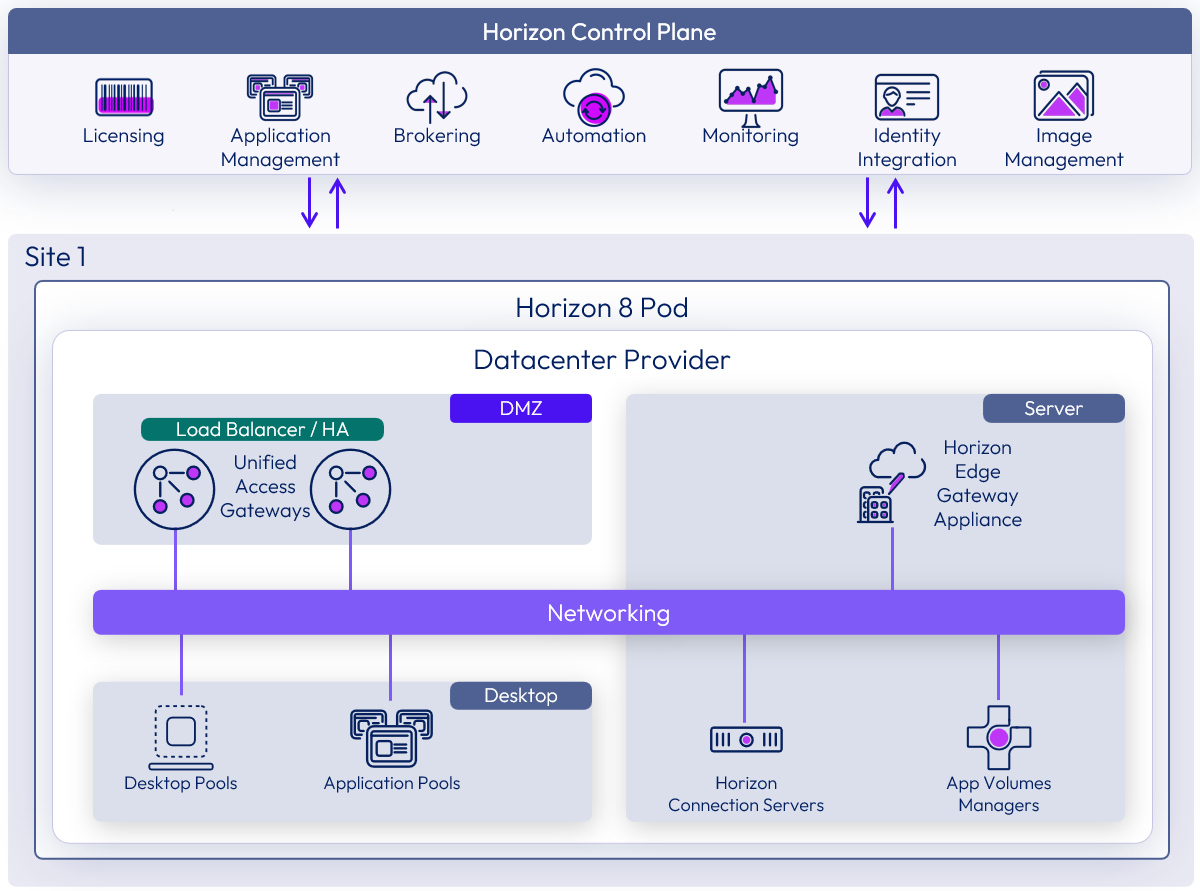
For overall Horizon Cloud architecture information, see Architectural overview in Omnissa Tech Zone.
In addition to this and related Horizon Cloud product documentation, the following Omnissa content is a helpful resource:
Was this page helpful?