The Horizon subscription license relies on an operational communication chain between the Horizon Edge deployment, Horizon Connection Server, and the Horizon Cloud license service. The license service syncs with the Horizon 8 Edge every 24 hours. License sync failures can occur, which might result in a service disruption. Horizon Cloud attempts to inform you of license sync failures in different ways. You can use the Horizon Universal Console to monitor the license sync status of your subscription licenses and troubleshoot sync issues.
When the Horizon Edge Gateway loses connectivity to Horizon Cloud, the license sync expiry process begins.
If the Horizon Edge Gateway remains disconnected for 15 days, the 90-day grace period for Horizon Cloud is triggered. In Horizon 8 environments that are cloud-connected through the Horizon 8 Edge Gateway, Horizon Console in Horizon 8 transitions to restricted mode.
After you activate a subscription license, it remains active for 105 days. To continue using all the features of Horizon Console, you must renew the license by connecting the Horizon Edge Gateway to Horizon Cloud.
The sections that follow describe the different ways that Horizon Cloud provides you with license sync status information.
Subscription License Sync Status on the Horizon Edge Details Page
You can view the status of a subscription license sync on the details page for a specific Horizon 8 Edge. For license sync failures, you can use the subscription license sync status information to troubleshoot the failure.
Click Capacity and with the Horizon Edges tab selected, select the name of a Horizon 8 Edge and then scroll to the Subscription License Sync Status section.
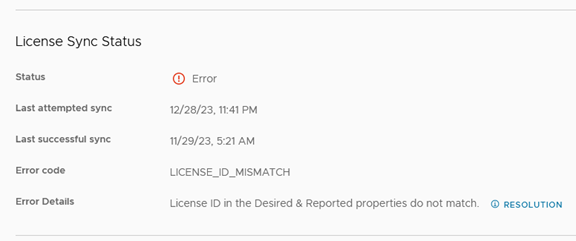
Note: The Subscription License Sync Status section is only available for Edges of type Horizon 8.
The Subscription License Sync Status section lists the following types of information.
| Status | The status of the license sync can be either Error or Succesful. |
| Last attempted sync | The date of the most recent license sync job execution |
| Last successful sync | The date of the most recent successful license sync |
| Error code | The error code (if any). |
| Error Details | Specific information about the error, including a Resolution tool tip. |
Subscription License Sync Status in the Admin Activity Logs
The Admin Activty Logs include information about license sync status.
Access the Activity Log page by selecting Monitor > Activity Log. The page opens with the Admin tab selected. See Monitoring Administrator and End User Activity from the Activity Log Page.
License Sync Failure In-App and Email Notifications
If a license sync failure occurs on consecutive days, starting on the third day, each affected Horizon 8 Edge sends notifications to the Horizon Universal Console about the license sync failure. See Monitoring and Managing Notifications.
Notifications Sent When Horizon 8 Edge Fails to Sync with Horizon Cloud
Notification Trigger Conditions
License Sync Failure Detected - One or more Horizon 8 Edge deployments have failed license sync health checks in the last 24 hours.
| Day Since Failure | Notification Frequency |
|---|---|
| Day 1 | First alert |
| Day 7 | Second alert |
| Day 11 | Daily alerts begin |
| Day 12 | Daily alert |
| Day 13 | Daily alert |
| Day 14 | Daily alert |
| Day 15 | Final warning |
Example: If a Horizon 8 Edge failed on January 1st, emails are sent as follows:
- January 1 (15 days left)
- January 7 (9 days left)
- January 11-15 (5, 4, 3, 2, 1 days left)
Note: Notifications are sent in the first 15 days of license sync failure between Horizon 8 Edge and the control plane. After this period, the system continues to function for up to 90 days, a total of 105 days of grace period from the time of license sync failure.
Was this page helpful?