On the Pool Groups page, you can assign users to dedicated single-session pool groups.
Although you can assign multiple users to a single desktop, only a single user can have a session on an individual VM at a time. Configure the Timeout Handling settings appropriately to ensure availability of the VM. For details about configuring the Timeout Handling settings, see Create a Single-Session Pool Group.
Procedure
-
In the side navigation, click Pool Groups.
-
Select the name of a dedicated-desktop pool group.
-
Click the VMs tab.
-
Above the table, select a pool from the drop-down menu to the left of the REFRESH link.
-
Select the VMs that you want to assign users to and click Assign.
-
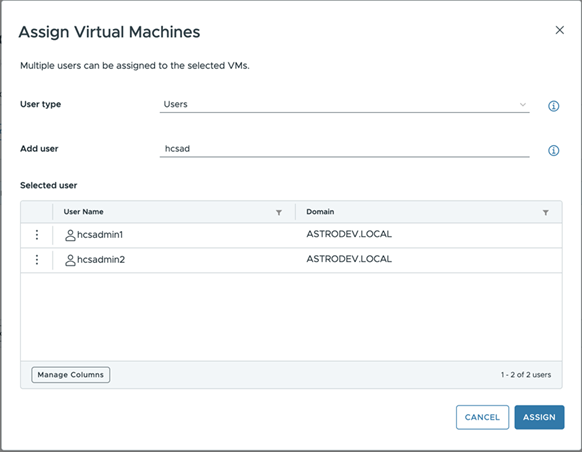
In the Add user text box, enter the user name and click the name of the user from the user names that are displayed.
You can repeat this step multiple times to add other users.
-
Click ASSIGN.
-
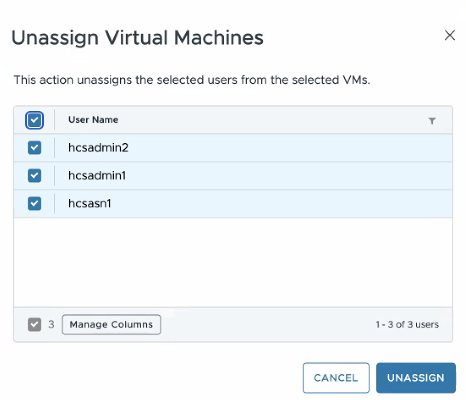
To unassign users, select one or more VMs, click UNASSIGN, select the specific users, and click UNASSIGN again.
When you select multiple VMs, the screen displays a consolidated list of all users assigned to the selected VMs. The list does not specify which user is associated with which VM. All users selected will be unassigned from all VMs, whether the unassignment is from one VM or many VMs.
Was this page helpful?