Using Horizon Cloud, you can create and deploy a Horizon Edge for the Nutanix capacity type.
Note: Horizon Cloud on Nutanix is currently available in Limited Availability (LA) mode only.
To deploy a Horizon Cloud on Nutanix Edge, you must set up your Horizon Cloud environment as described in the following sections and redeem the Horizon Cloud Welcome email sent to the administrator account.
For information about redeeming the Horizon Cloud Welcome email, see Onboarding to Horizon Cloud. Additional information is available in Omnissa Connect product documentation.
For onboarding to Omnissa Connect, you will need the following elements:
- Omnissa Connect Org Name - This is registered upon your initial Omnissa Connect login.
- Omnissa Connect Org ID - This is available from the View Organization page in Omnissa Connect.
- Omnissa Connect oAuth Application ID and Application secret - This is created by using the View Organization > oAuth page in Omnissa Connect.
To configure an Identity Provider, see Identity and Access Management in Horizon Cloud.
The Horizon Edge architecture for the Nutanix capacity type within Horizon Cloud is shown below.
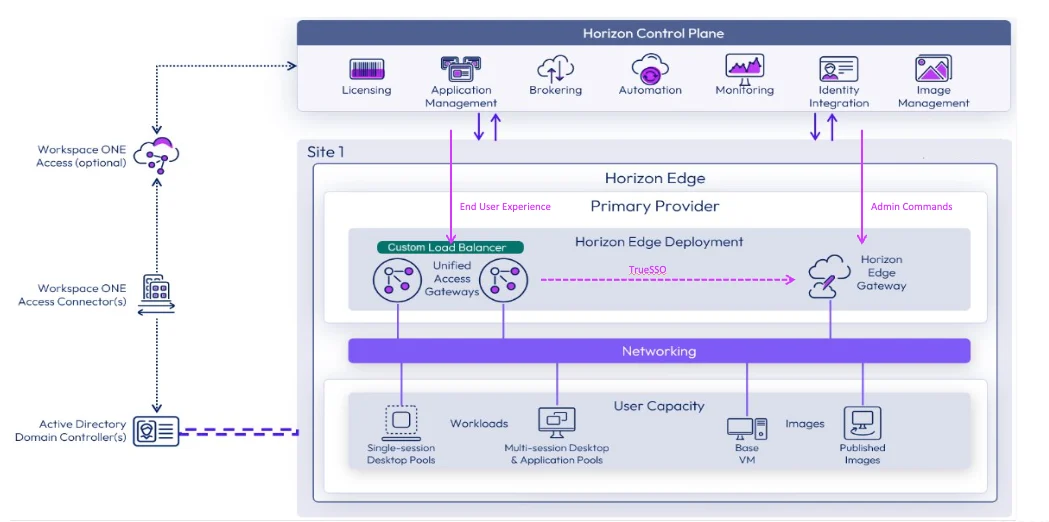
For overall Horizon Cloud architecture information, see Architectural overview in Omnissa Tech Zone.
Was this page helpful?