In Horizon Cloud, if you are using Microsoft Entra ID as your identity provider, and Microsoft Entra ID is not yet integrated with your on-premises Active Directory, complete the following registration and synchronization tasks.
Required AD Attributes to Sync with Entra ID Attributes
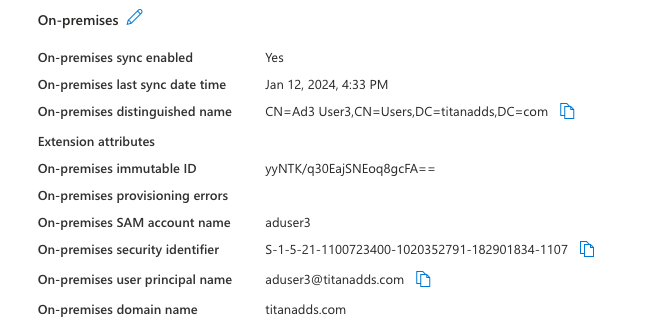
When using Microsoft Entra ID Commercial or Microsoft Entra ID Government as your identity provider, you must map the following Active Directory attributes to their respective Entra ID attrubutes:
- Distinguish Name (distinguishName) to onPremisesDistinguishedName
- SAM account name (samAccountName) to onPremisesSamAccountName
- User Principal Name (userPrincipalName) to onPremisesUserPrincipalName
- Security Identifier (securityIdentifier) to onPremisesSecurityIdentifier
- Domain Name (domainName) to onPremisesDomainName
When configured, the Microsoft Entra ID displays these attributes in a format similar to that shown below.
Prerequisites
-
Verify that you have access to Horizon Cloud. To create a login, see Onboarding for Horizon Cloud Administrators.
-
Verify that the on-premise Active Directory server is supported.
-
Review Connecting your Identity Provider, including information about required permissions.
Procedure
-
If you do not have an existing tenant, create a new tenant. See the appropriate documentation for your capacity provider, For example, for Micorosoft Azure, see Quickstart: Create a new tenant in Azure Active Directory.
-
Create a user in the capacity provdier with a Microsoft Entra ID App Global Administrator role.
-
Synchronize your on-premise Active Directory to the capacity provider.
-
On the on-premise Active Directory server, create users and groups and assign users to the groups.
Verify that all users are a member of a group.
-
Install Microsoft Entra ID Connect on the on-premise Active Directory server. For installation instructions, see the appropriate documentation. For example, for Microsoft, see Prerequisites for Azure AD Connect.
-
When the Microsoft Entra ID Connect configuration is complete, verify that the users and groups are created in Microsoft Entra ID.
-
What to do next
Create the required Active Directory domain accounts. See Creating Active Directory Domain Bind and Domain Join Accounts.
Was this page helpful?