The VNets that your Horizon Edge is deployed into must have the ability to resolve both internal machine names and external names. The ability to resolve internal virtual machine (VM) names is needed for the service's Active Directory domain-join operations with the VMs that get deployed in your Microsoft Azure environment.
Prerequisites
- Ensure your Microsoft Azure region has the VNet topology that you plan to specify when you deploy a Horizon Edge instance.
- Ensure that the DNS server settings that you or your networking team are going to configure for that VNet topology can reach and resolve Active Directory and the addresses listed in Make Appropriate Destination URLs Reachable to Deploy a Horizon Edge Gateway in a Microsoft Azure Environment.
Procedure
-
From the Microsoft Azure portal's left navigation bar, click
 (Virtual networks) and then click the virtual network that you are going to use for your Horizon Edge deployment.
 -
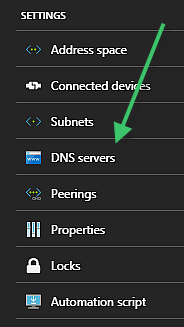
Display the virtual network's DNS server settings by clicking DNS servers.
-
Using the Custom option, add the address of the DNS server you want to use for name resolution and click Save.
Important
If deploying an Edge Gateway (AKS), regarding a Horizon Edge using an AKS cluster, if the VNet you are using for the Horizon Edge deployment has a custom DNS server, you must add the Microsoft Azure DNS IP address 168.63.129.16 as a DNS forwarder for external-name resolution.
Was this page helpful?