When the provider type is Microsoft Azure, you can use Azure resource tags to manage resources used with the Microsoft Azure Edge. When you configure tags on resources in Horizon Cloud, those tags are applied to the appropriate Azure resource groups in Microsoft Azure for the resources that you applied them to in Horizon Cloud. You can then use the resource tags to track Horizon Cloud resources.
Azure resource tags are metadata elements that allow you to manage resources in your environment. A tag consists of a key and the key's corresponding value.
You can add up to 30 Azure resource tags across Microsoft Azure providers and to the following supported resources related to those Horizon Cloud providers:
- Microsoft Azure Edges
- Unified Access Gateways
- Pools
- Images
In Horizon Cloud, we only apply custom Azure resource tags to resource groups, except for images. We do not apply Azure resource tags to VMs or other Azure objects. While there are hidden service level tags that are applied to individual objects, they are for internal usage only.
For images, the resource tags are only applied to image versions in Azure Compute Gallery.
Key Concepts
-
Propagation/Inheritance: In the Horizon Universal Console, when you add or edit a provider, you can add Azure resource tags. At that time, you have the option of propagating the tags to all supported resources. Allowing resources to inherit resource tags in this way can facilitate the application and organization of resource tags. If inheritance is turned off, any tags from the primary provider already applied to resource groups are removed until inheritance is turned back on.
-
Conflicting Tags: When a provider with propagation enabled has the same tag configured on a Horizon Edge or Unified Access Gateway, or on pools, the tag configured on the resources takes precedence and overwrites the provider tags.
-
Syncing Tags: For all resources except for images, when resource tags are added or edited, Horizon Cloud asynchronously updates those tags on the appropriate resource groups. If an error occurs during synchronization an error message displays in the Horizon Universal Console, presenting you with the option to retry.
Note: For images, tags available on the provider are added to the image resource group only at the time that the image resource group is created.
-
Precedence: Tags configured in the Horizon Universal Console will overwrite any tags configured with Azure Policy.
-
Azure Tagging Policies: If your Azure Policy includes any of the deny policies, configure the required tags on the provider and turn on the option to propagate tags to the supported resources. See The Microsoft Azure documentation on policy definitions for tag compliance.
-
Viewing Azure Tags: After you add Azure tags to a specific resource, you can view the list of tags for that resource by expanding Capacity > Horizon Edges in the left-pane navigation, selecting the appropriate resource type, and clicking the specific resource. The Azure resource tags are listed among the other data for that specific resource.
Adding Azure Resource Tags to a Provider and Allowing Inheritance to Supported Resources
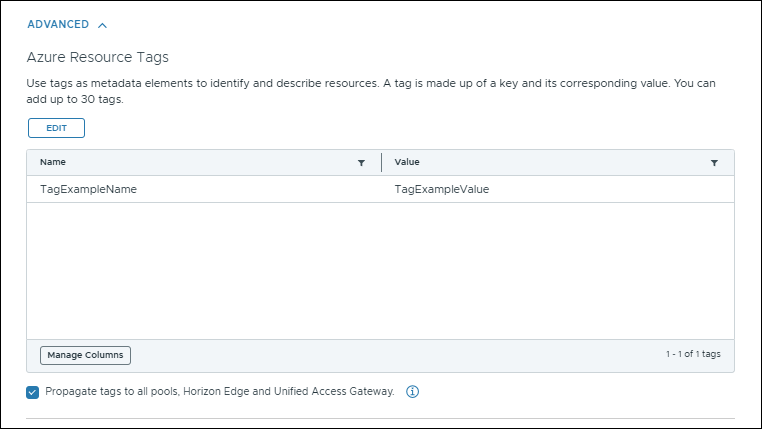
In the Horizon Universal Console, when you add or edit a provider, you can add Azure resource tags and propagate the tags to the supported resources.
The following screenshot shows a resource tag being added to a provider where the option to propagate tags to supported resources is selected.
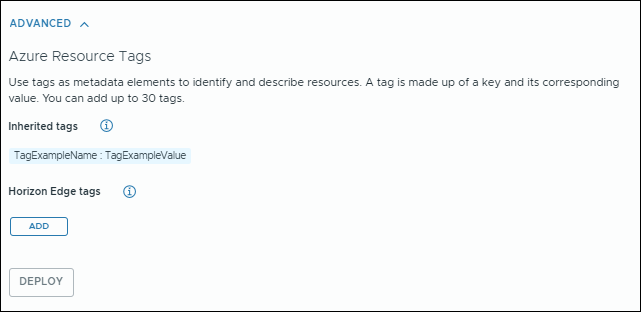
Later, when you manage a supported resource, a list of the tags inherited from the provider are displayed. At that point, you can choose to add resource-specific tags directly to that resource.
The following screenshot shows the Horizon Edge Gateway workflow where the resource tag inherited from the provider is listed. The Add button is selectable, allowing you to add Horizon Edge specific tags.
Was this page helpful?