To log into the Horizon Universal Console of Horizon Cloud, perform the following steps:
-
Go to https://connect.omnissa.com. You land on the dashboard of your default organization.
-
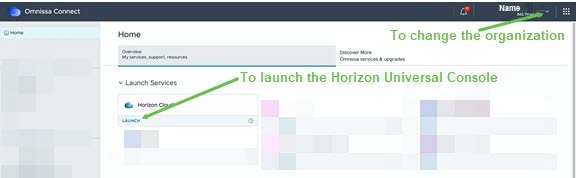
If you have multiple organizations, navigate to the top right corner and click the drop-down arrow next to your name to select the organization you want to access.
-
Launch the Horizon Cloud tile to open the Horizon Universal Console.
Was this page helpful?