If an application has several packages and you want to deliver the latest version of the application to a user or user group, then the CURRENT marker can be set on the package. The user or user group can be configured to always receive the package version which has the marker even if the marker is removed from one package and set on the other package.
Here are some of the considerations when setting a CURRENT marker to a package:
-
Move and delete operations cannot be performed on a package which is set with a
CURRENTmarker.To perform either operation, the marker must be removed from the package.
-
Only one package in an application can be set as
CURRENT.
Note: For an App Volumes application to be delivered as on demand to entitled users, the following must be considered:
- The package must be marked as
CURRENT. - The captured application must have shortcuts.
For more information about application shortcuts criteria, see Understanding Package Delivery Modes of an App Volumes Application Package Using Horizon Cloud. - If the
CURRENTmarker is changed from one package to another and the shortcuts are missing or have different paths in the second package, then the application is not launched.
Prerequisites
Ensure that the package you want to mark as CURRENT has completed the packaging process and the status of the package is Ready.
Procedure
-
In the Horizon Universal Console, navigate to Desktop and App Catalog > App Volumes.
-
Click the application which has the package on which you want to set the
CURRENTmarker.The list of packages for this application is displayed.
-
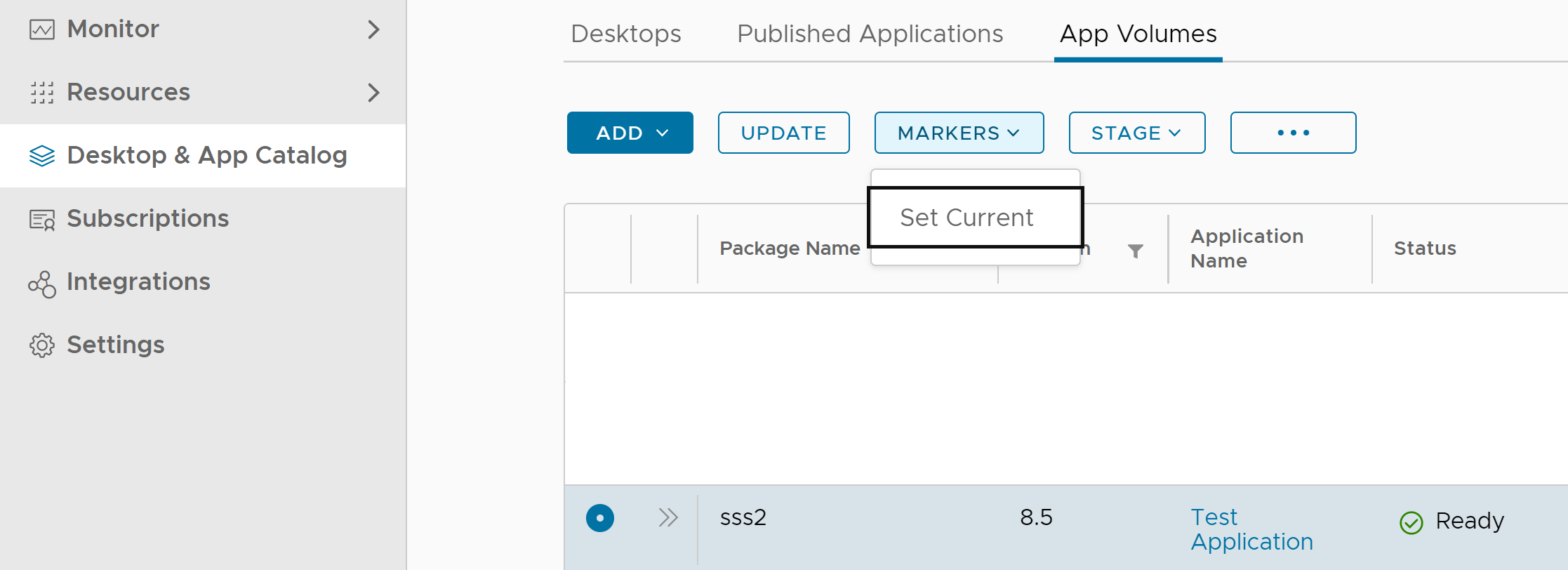
Select the package.
-
Click MARKERS > Set Current.
-
On the Set Current dialog box, click SET.
Package name is displayed with the
CURRENTmarker.
What to do next
You can now entitle this package to users or user groups. For more information about creating an entitlement, see Create an Entitlement for an App Volumes Application using Horizon Cloud.
Was this page helpful?