Horizon Cloud supports the Horizon Control Plane, which is a cloud-hosted control plane that provides SaaS services for use with your Horizon 8 cloud-connected and DaaS Horizon Cloud deployments.
There are two main use cases for the Horizon Cloud service:
-
Platform for deploying Horizon Cloud (DaaS) on Microsoft Azure, Microsoft Azure with integrated Windows 365, and Amazon WorkSpaces Core.
-
Control Plane for connecting to Horizon 8 pods and providing optional common SaaS services. Horizon 8 pods deployed on-premises and on public cloud SDDCs can be connected to the Horizon Control Plane within Horizon Cloud and consume additional SaaS services.
This publication is for administrators who want to deliver virtual desktops and apps at scale to end users within their organization, and efficiently manage those virtual desktops and apps by using the Horizon Cloud and Horizon Control Plane.
Benefits of the Horizon Control Plane - Microsoft Azure and Amazon WorkSpaces Core Deployments
See the What's New section of Horizon Cloud Release Notes for additional features and capabilities as they become available.
This section lists the benefits of the Horizon Cloud Horizon Control Plane for deployments for Microsoft Azure and Amazon WorkSpaces Core. These are not applicable to Horizon 8 pods connecting to the Horizon Control Plane consuming additional SaaS services.
See the What's New section of Horizon Cloud Release Notes for additional features and capabilities as they become available.
- Lower cost A Horizon Edge with thin-edge infrastructure and pod-less deployments provide for lower operational costs, faster time to value, and reduced maintenance by eliminating Horizon infrastructure components.
- Improved visibility and troubleshooting Using the same model across all platforms improves visibility and troubleshooting capabilities with proactive alerting and advanced reporting through integration with Workspace ONE Intelligence.
- Seamless cross-environment experience Providing common administrator and end-user experiences across environments streamlines administration and increases end-user productivity.
- Advanced automation The API-driven platform supports advanced automation and integration with third-party apps and services for day-1 and day-2 processes.
- Scalability A Horizon Edge with thin-edge architecture and cloud-native architecture increases scalability across all platforms.
Architectural Characteristics of the Horizon Control Plane - Native Cloud Deployments
Several architectural characteristics define how Horizon Cloud operates and also how this service improves upon that of its Horizon Cloud first-gen predecessor.
Note: This section covers Horizon Cloud characteristics for native Microsoft Azure and Amazon WorkSpaces Core. It does not address the use case of Horizon 8 pods connecting to the Horizon Control Plane and consuming additional SaaS services.
The architecture provides for cloud-based deployments that are easy to configure, operate, and manage.
The following diagram illustrates the relationship between the Horizon Control Plane and an initial Horizon Edge deployed into Microsoft Azure Cloud (Horizon Edge-1). In this example, while working in the deployment wizard, the administrator chose to use two Horizon Edge Gateway instances.
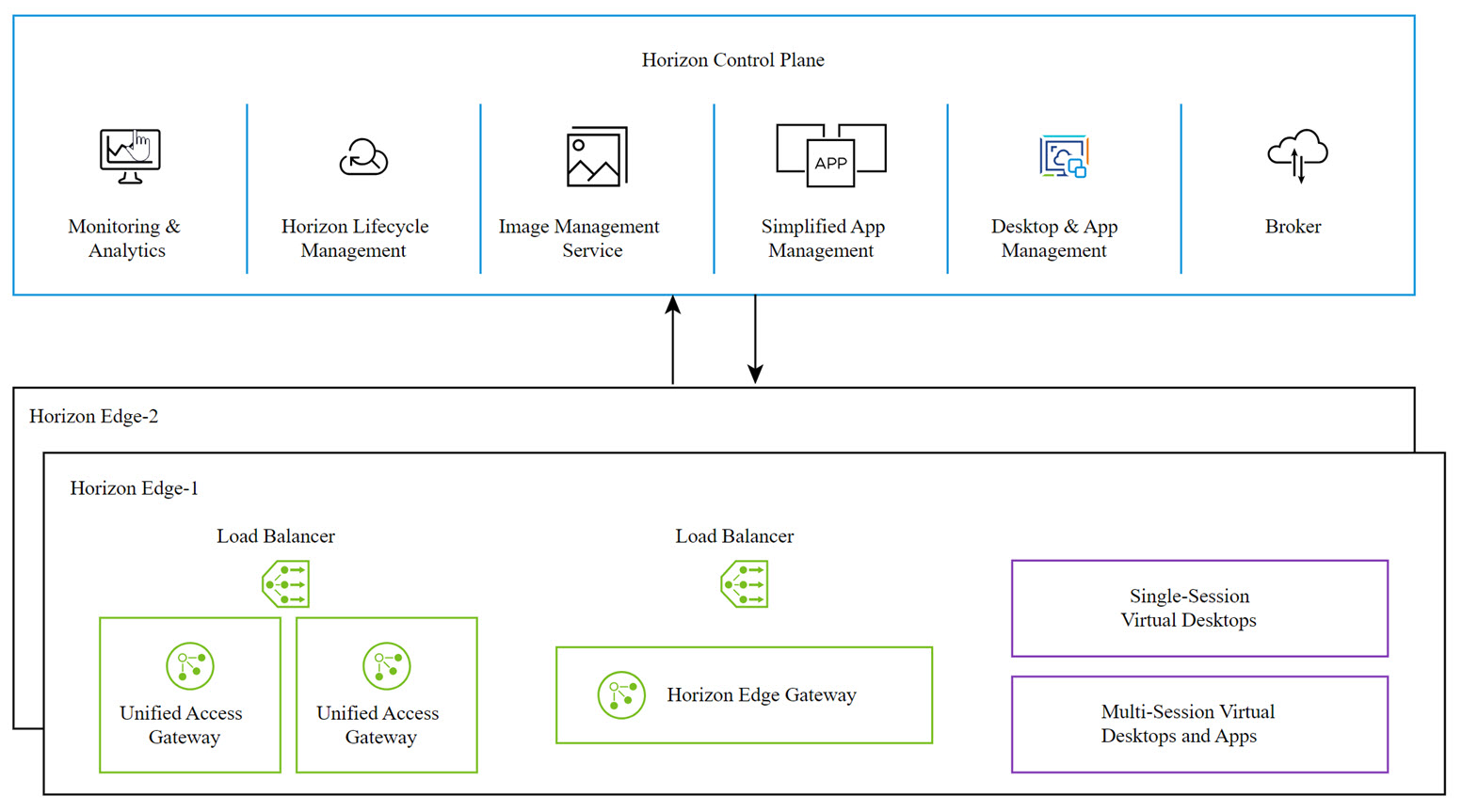
The following core infrastructure elements provide these services:
- Horizon Control Plane.
- Horizon Edge Gateway instance. For Microsoft Azure Cloud as the provider, a Microsoft Azure load balancer is deployed with the instance.
- Unified Access Gateway instances and a load balancer for the instances.
For more details about the architecture, see Horizon Cloud Architecture.
Note: Significant improvements differentiate Horizon Cloud from its preceding Horizon Cloud first-gen. A key benefit of Horizon Cloud is that many of the infrastructure components that were previously deployed into an organization's environment now reside as services in the Horizon Control Plane. Differences in the user experience are outlined in the Self-service Migration to Horizon Cloud. For current additions to Horizon Cloud, see the Release Notes.
Was this page helpful?