To configure and manage your Hub Services experience, you navigate between the different administration consoles.
- Workspace ONE Hub Services
- Omnissa Access
- Workspace ONE UEM
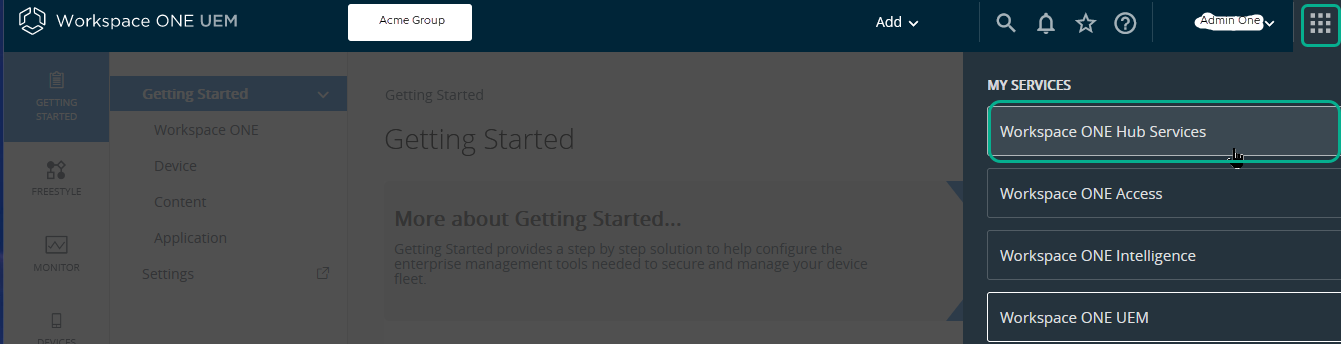
You can quickly switch between consoles from the UEM console. In the Workspace ONE UEM console, click the 3x3 icon in the right corner to switch between consoles.
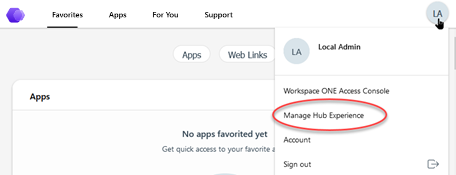
You can access the Hub Services console from your Workspace ONE Intelligent Hub portal.
For detailed information about configuring the services, see the appropriate documentation libraries. See Accessing Other Documents. The Using and Managing Hub Services guide is not meant to describe how to configure and manage Workspace ONE UEM and Omnissa Access.
Major Intelligent Hub Tasks Performed from Each Administration Service| Workspace ONE UEM | Omnissa Access | Hub Services |
|---|
- Run the Workspace ONE Getting Started Wizard to configure integration with Omnissa Access
- Activate Hub Services to enable Hub Services features.
- Set up device enrollment and management rules for devices that use single sign-on to the Workspace ONE Intelligent Hub app.
- Create and manage UEM user accounts that access Hub Services features.
This includes enabling the Local Basic User accounts for Workspace ONE.
|
- Manage changes in the Workspace ONE UEM Integration page configured to create the trusted relationship with Workspace ONE UEM.
- Configure authentication methods used for single sign-on.
- Create conditional access policies to control access to resources.
- Enable the compliance check feature to verify that managed devices adhere to Workspace ONE UEM compliance policies.
- Map Identity Manager Domains to Customer Organization Groups in Workspace ONE UEM.
| Manage the Hub Services features.
- App Catalog. Customize how apps displays in the app catalog and enable the app rating feature. Review the rating reports.
- Enable the Custom tab and configure the URL.
- Create templates to customize the Intelligent Hub experience for different users.
- Enable People when UEM is integrated with Omnissa Access.
- Create and send Notifications.
- Manage Help and Support page content.
- Manage the Hub Services system settings.
- Customize branding.
|