The Hub Notifications service is a cloud-hosted service designed to generate and serve real-time notifications to your employees. In Hub Services, you can create custom informational and actionable notifications to send to selected groups in your organization.
You also have the out-of-box capability to send weekly new app notification to all employees, if you choose to turn it on.
Users do not need to be in the Workspace ONE Intelligent Hub app to receive notifications. They can respond directly on the notification that is being viewed. When users are logged in to Workspace ONE Intelligent Hub, they can view their notifications from the For You tab.
The Difference Between Notifications and Banners
This section is specifically about notifications. However, understanding how notifications differ from banners is useful. You can use the Hub Services console to create both notifications and banners. Both methods allow administrators to share information with end users.
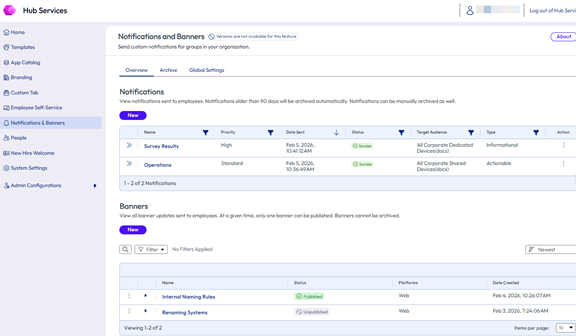
The two methods differ as follows:
Banners - Banner messages are pulled by user devices at login or refresh. Banners are better suited for announcements that all users see while active. See Managing Banners in Workspace ONE Hub Services
Notifications - Notification messages are pushed to users unrelated to user activity. Notifications are better suited for time sensitive communication, or when communications are targeted towards a specific group.
Source of Authentication Makes a Difference
When the source of authentication for Workspace ONE Intelligent Hub is set to Workspace ONE UEM, you do not need to configure Omnissa Access to create custom notifications.
- Users receive notification on their iOS, Android, macOS, and Windows devices.
- Users receive New App notifications for apps used on their devices.
When the source of authentication is set to Omnissa Access, you have additional notification features.
- Users receive notification cards on their iOS, Android, macOS, and Windows devices and in the Hub portal.
- Users receive New App notifications about web and virtual apps.
To see which service is the source for authentication in the Workspace ONE Intelligent Hub app, in the UEM console go to the Devices > Device Settings > Devices & Users > General > Enrollment > Authentication tab.
Note: If you change the source of authentication from Workspace ONE UEM to Omnissa Access, notifications that were received from UEM are no longer available for viewing in the Workspace ONE Intelligent Hub app.
Was this page helpful?