By default, the notifications tab in Workspace ONE Intelligent Hub is labeled For You. You can configure a custom name for this tab in the Hub Services console to better reflect how your organization uses it—for example, Notifications, Surveys, or any term that aligns with your use case.
When you configure a custom name, it replaces the For You label for users on the Intelligent Hub web portal. If no custom name is configured, or if the custom name is cleared, users continue to see the default localized label, For You.
Platform Support
The For You tab rename feature is available in Workspace ONE Intelligent Hub on the following platforms:
- Web portal - Supported in the current release.
In subsequent releases, additional client platform support will be provided, potentially including iOS, Android, macOS, and Windows platforms.
Configure a Custom For You Tab Name
-
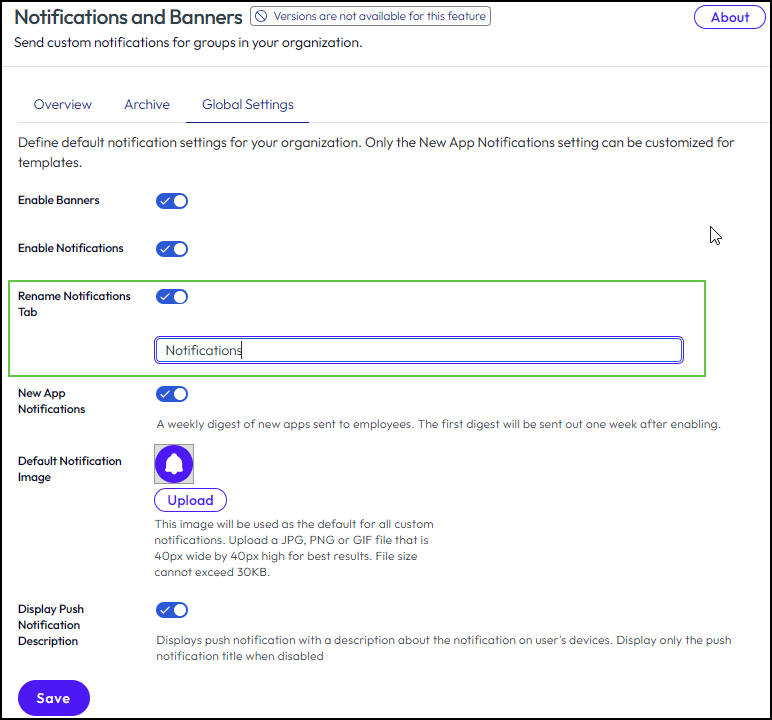
In the Hub Services console, navigate to Notifications & Banners and select the Global Settings tab.
-
Enable the Rename Notifications Tab toggle.
-
In the field that appears, enter a custom name for the tab.
-
Maximum length: 13 characters.
-
The custom name is not localized. Configure the name in the language your users expect to see.
-
UTF-8 characters are supported, so you can configure the name in any language.
-
-
Click Save.
Results
Users on the Intelligent Hub web portal see the custom tab name instead of the default For You label.
If you clear the custom name, the tab label reverts to the default For You label.
Note: This setting does not support versioning. A single custom name applies globally to all users in your organization and cannot be customized per group or template. See Using Hub Templates to Customize the Workspace ONE Intelligent Hub Experience for Different Users for details about how versions apply to Omnissa Workspace ONE Hub Services.
Related Topics
Was this page helpful?