Definitions for data displayed and used in Omnissa Intelligence products are helpful for creating workflows and reports and for analyzing dashboard widgets.
What is a Normalized data point?
In Intelligence, there are some data points tagged as Normalized. The tag identifies that Intelligence has taken data and reformatted it for ease of use.
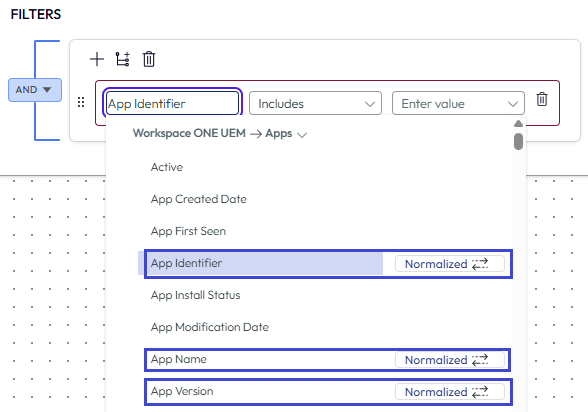
Normalized
For example, batteries from different manufactures (and sometimes from the same manufacturer) can have different capacities when measured. There are various reasons for these differences, like material discrepancies, battery size, or environmental conditions. So that you do not need to process these differences while creating your dashboards, workflows, and reports, Intelligence has compared the different battery capacity levels and created a normalized version of the data point Actual Battery Capacity Level.
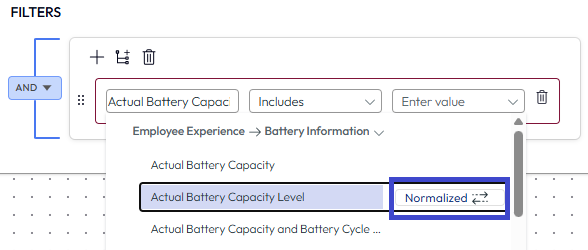
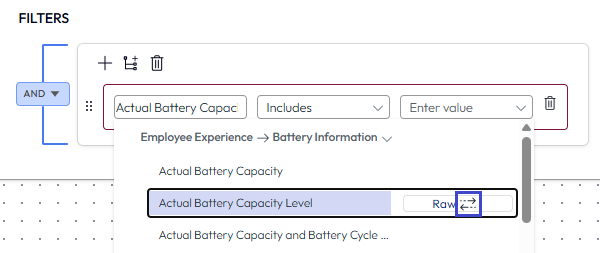
Convert to raw with the toggle
However, you may want to create a dashboard, workflow, or report with the actual battery capacity level of a specific resource's battery. Access that raw data point by using the toggle arrows and converting the Normalized data point to the Raw data point.
Intelligence does not reformat the raw data point, so the battery capacity level is the level that is specific and true to that resources's battery. It's not a reformatted version of the battery capacity level.
To return to the normalized version, just use the toggle arrows again.
Was this page helpful?