Use Horizon Cloud Data in reports in Omnissa Intelligence to mitigate issues, drive business decisions, and share information with other departments.
Types of reports
Use custom reports and out-of-the-box reports to analyze your Horizon Cloud data.
- Custom reports - Build custom reports based on raw data collected by Omnissa Intelligence from your Horizon deployment.
- Out-of-the-Box reports - Find predefined reports for your Horizon Cloud integration. With out-of-the-box reports, you can edit the Report Name, Date Range, and the Download Format. The default date range is 24 hours and the default download format is CSV.
- Navigate to Marketplace > Templates > Reports.
- Select the Horizon version drop-down filter for Horizon Cloud Next-Gen Reports.
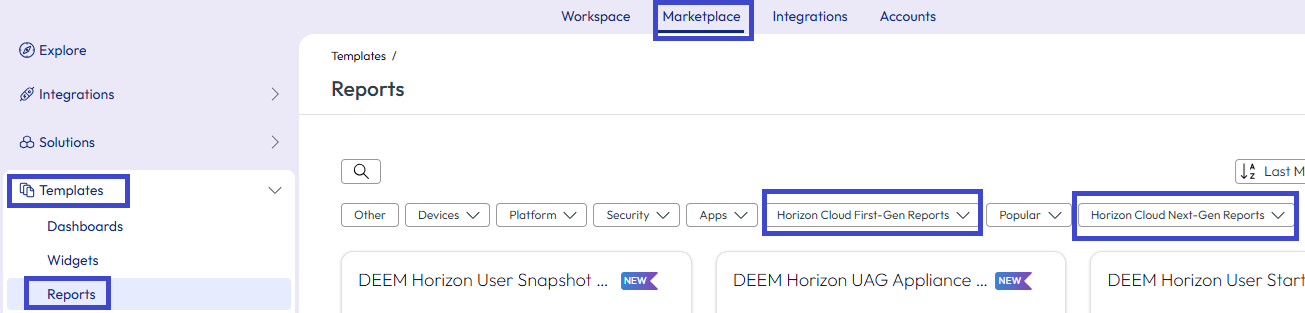
- Select a report template, like Horizon Sessions.
- Preview the template and use Add To Workspace to add it to your reports.
- Edit the Report Name, Date Range, and the Download Format as desired.
- Save the report.
- To access the report, go to Workspace > Reports, select the Overview tab, and select the report from the reports list view.
Predefined Horizon Cloud report descriptions
| Report Name | Report Description | Column Names (UI to CSV file column name mapping) | Column Name Descriptions |
|---|---|---|---|
| Horizon Pool Concurrency | Concurrency status of all pools. | - Capacity = horizonpoolconcurrencytitan_capacity.name - Edge Name = horizonpoolconcurrencytitan_edge_name.name - Peak Concurrency = horizonpoolconcurrencytitan_max_concurrent_session_count.name - Pool Name = horizonpoolconcurrencytitan_template_name.name - Provider Type = horizonpoolconcurrencytitan_edge_type.name - Unique Users = horizonpoolconcurrencytitan_unique_user_count.name | - Capacity: The total number of sessions that the pool can support concurrently. This value represents the maximum capacity allocated to the specific Horizon pool. - Edge Name: The name of the Horizon Edge associated with the pool. This indicates the specific edge server or deployment region being utilized. - Peak Concurrency: The highest number of concurrent sessions observed in the pool during the reporting period. This value helps identify peak utilization trends. - Pool Name: The name of the Horizon pool being analyzed. This helps distinguish between different pools configured within the environment. - Provider Type: Indicates the type of infrastructure or platform hosting the Horizon pool. Valid values include: - Microsoft Azure: The pool is hosted on the Microsoft Azure cloud platform. - Horizon Enterprise: The pool is part of a Horizon Enterprise deployment, typically on-premises. - vSphere: The pool is hosted on vSphere infrastructure. - Unique Users: The total count of distinct users who have accessed the pool during the reporting period. This metric provides insights into user engagement and adoption. |
| Horizon Sessions | Record of sessions by user, pod, and pool. | - Client IP = horizonsessiontitan_view_client_ip_address.name - Client Type = horizonsessiontitan_view_client_type.name - Client Version = horizonsessiontitan_client_version.name - Desktop Name = horizonsessiontitan_host.name - Disconnect Time = horizonsessiontitan_session_disconnect_datetime_string.name - Domain = horizonsessiontitan_view_client_broker_domain_name.name - Edge Name = horizonsessiontitan_edge_name.name - Logon Duration(secs) = horizonsessiontitan_session_agent_logon_time_in_second.name - Logoff Time = horizonsessiontitan_session_logoff_datetime_string.name - Max Logon Time(secs) = horizonuserusagetitan_max_session_agent_logon_time_in_second.name - Pool Name = horizonsessiontitan_template_name.name - Protocol Type = horizonsessiontitan_view_client_protocol.name - Session Active Duration(hrs) = horizonsessiontitan_session_active_duration_within.name - Session Disconnected Duration(hrs) = horizonsessiontitan_session_total_disconnected_duration_within.name - Session Duration(hrs) = horizonsessiontitan_session_total_duration_within.name - Session Idle Duration(hrs) = horizonsessiontitan_session_idle_duration_within.name - Session Type = horizonsessiontitan_s_type.name - Total Session Active Duration(hrs) = horizonsessiontitan_session_active_duration.name - Total Session Disconnected Duration(hrs) = horizonsessiontitan_session_total_disconnected_duration.name - Total Session Duration(hrs) = horizonsessiontitan_session_total_duration.name - Total Session Idle Duration(hrs) = horizonsessiontitan_session_idle_duration.name - User Name = horizonsessiontitan_horizon_session_user.name | - Client IP: The IP address of the client device used to connect to the Horizon session. - Client Type: The type of client used for the Horizon session (examples include Windows, Mac, iOS, Android, or Web). - Client Version: The specific version of the Horizon Client software used to establish the session. - Desktop Name: The name of the virtual desktop or session host associated with the Horizon session. - Disconnect Time: The timestamp when the session was disconnected, presented in a human-readable format. - Domain: The domain associated with the client broker used to initiate the session. - Edge Name: The name of the Horizon Edge that managed the session, indicating the region or specific edge deployment. - Logon Duration (secs): The duration (in seconds) it took for the user to log in to the session, measured from the point of initiating login to successful desktop access. - Logoff Time: The timestamp when the user logged off the session, presented in a human-readable format. - Max Logon Time (secs): The maximum duration (in seconds) taken for any user session to log in during the reporting period. - Pool Name: The name of the Horizon pool associated with the session. - Protocol Type: The type of display protocol used for the session (examples include PCoIP and Blast). - Session Active Duration (hrs): The total duration (in hours) during which the session was actively in use within the specified reporting period. - Session Disconnected Duration (hrs): The total duration (in hours) during which the session was disconnected but not yet logged off within the reporting period. - Session Duration (hrs): The total duration (in hours) of the session, including both active, disconnected, and idle time. - Session Idle Duration (hrs): The total duration (in hours) during which the session was idle within the specified reporting period. - Session Type: The type of Horizon session, such as dedicated desktop, floating desktop, or session-based. - Total Session Active Duration (hrs): The cumulative active duration (in hours) of a session. - Total Session Disconnected Duration (hrs): The cumulative disconnected duration (in hours) for a session. - Total Session Duration (hrs): The cumulative total duration (in hours) of a session. - Total Session Idle Duration (hrs): The cumulative idle duration (in hours) for a session. - User Name: The name of the user associated with the Horizon session. |
| Horizon User Usage | Record of desktop and application usage for each user. | - Active Duration(hrs) = horizonuserusagetitan_session_active_duration_within.name - Average Logon Time(secs) = horizonuserusagetitan_average_session_agent_logon_time_in_second.name - Domain = horizonuserusagetitan_view_client_broker_domain_name.name - Edge Name = horizonuserusagetitan_edge_name.name - Idle Duration(hrs) = horizonuserusagetitan_session_idle_duration_within.name - Pool Name = horizonuserusagetitan_template_name.name - Session Duration(hrs) = horizonuserusagetitan_session_total_duration_within.name - Total Active Duration(hrs) = horizonuserusagetitan_session_active_duration.name - Total Application Sessions = horizonuserusagetitan_application_session_count.name - Total Desktop Sessions = horizonuserusagetitan_desktop_session_count.name - Total Idle Duration(hrs) = horizonuserusagetitan_session_idle_duration.name - Total Session Duration(hrs) = horizonuserusagetitan_session_total_duration.name - Total Sessions = horizonuserusagetitan_session_count.name - User Name = horizonuserusagetitan_horizon_session_user.name | - Active Duration (hrs): The total duration (in hours) that the user's sessions were actively in use during the specified reporting period. - Average Logon Time (secs): The average time (in seconds) it took for the user to log in to their sessions, calculated as the mean logon time across all sessions for the same user in the reporting period. - Domain: The domain associated with the client broker that the user used to establish their Horizon sessions. - Edge Name: The name of the Horizon Edge that managed the user's sessions, indicating the specific edge server or deployment region. - Idle Duration (hrs): The total duration (in hours) during which the user's sessions were idle within the specified reporting period. - Pool Name: The name of the Horizon pool associated with the user's sessions. - Session Duration (hrs): The total duration (in hours) of all sessions for the user within the reporting period, including active, disconnected, and idle time. - Total Active Duration (hrs): The cumulative active duration (in hours) across all sessions for the user. - Total Application Sessions: The total number of application sessions launched by the user during the reporting period. - Total Desktop Sessions: The total number of desktop sessions initiated by the user during the reporting period. - Total Idle Duration (hrs): The cumulative idle duration (in hours) across all sessions for the user. - Total Session Duration (hrs): The cumulative total duration (in hours) of all sessions for the user, including active, disconnected, and idle time. - Total Sessions: The total number of sessions (both desktop and application sessions) initiated by the user during the reporting period. - User Name: The name of the user associated with the sessions. |
| Horizon Utilization | Record of desktop and application usage for each user. | - Application Session Count = horizonutilizationtitan_application_session_count.name - Desktop Session Count = horizonutilizationtitan_desktop_session_count.name - Event Time = event_timestamp - Max Concurrent Sessions = horizonutilizationtitan_max_concurrent_session_count.name - Max Concurrent Users = horizonutilizationtitan_max_concurrent_user_count.name - Pool Name = horizonutilizationtitan_template_name.name - Total Capacity = horizonutilizationtitan_total_capacity.name - Total Utilization = horizonutilizationtitan_total_utilization.name - Unique Users = horizonutilizationtitan_unique_user_count.name | - Application Session Count: The total number of application sessions initiated within the reporting period. - Desktop Session Count: The total number of desktop sessions initiated within the reporting period. - Event Time: The start time of the interval during which the utilization statistics were collected, presented in the format YYYY-MM-DD HH:MM:SS.mmm (examples include 2024-09-26 07:00:00.000). - Max Concurrent Sessions: The maximum number of concurrent sessions observed within a one-minute interval during the specified reporting time. - Max Concurrent Users: The maximum number of unique users logged in concurrently within a one-minute interval during the specified reporting time. - Pool Name: The name of the Horizon pool being monitored for utilization. - Total Capacity: The total number of sessions the pool can support concurrently, representing the maximum capacity of the pool. - Total Utilization: The utilization rate of the pool, representing the percentage of the total capacity that was in use during the reporting period. - Unique Users: The total count of distinct users who accessed the pool during the reporting interval. |
Use UTC to configure date ranges in predefined reports
The Horizon predefined reports for Horizon Cloud display data in UTC (Coordinated Universal Time). If you configure a report with the local time, the predefined report converts the local time to UTC.
Note: Consider configuring your predefined reports in UTC so that you do not have to convert date ranges when you get your report results.
Also, Horizon predefined reports cut off one day of data if the first and last days of the configured date range do not include the whole day.
For example, if the date range configured is 2023-08-31 23:00:00 to 2023-09-29 23:00:00, the results do not include data for the day 2023-09-29. The report actually displays data for 2023-08-31 00:00:00 to 2023-09-29 00:00:00.
Why are there differences in report results?
There are several reasons why a Horizon predefined report can display different results when compared to the results of another reporting system.
- The Horizon predefined reports can modify the configured date range of a report to help increase report generation speed. For details about the date range modification, see Use UTC to configure date ranges in predefined reports.
- The Horizon predefined reports can aggregate and import raw data at 5-minute intervals to help accuracy. This degree of aggregating granularity is not found in many reporting systems.
Was this page helpful?