Register Omnissa Unified Access Gateway (UAG) with Omnissa Intelligence to use Unified Access Gateway data in Intelligence. You can also deauthorize the UAG integration from Intelligence and get a new credentials file if you need one after upgrading the UAG. The UAG is a Data Source and it ingests data into the reports data warehouse for use in dashboards and reports.
Unified Access Gateway documentation
Find details on how to use the credentials file downloaded from Intelligence in the Unified Access Gateway in the topic Integrate with Intelligence.
Registering the UAG
To display Unified Access Gateway data in dashboards and reports, authorize it to share data with Intelligence.
Note: Save the credentials file so you can re-upload it to the UAG console after an upgrade. If you do not save the credentials file, you can register the UAG again in Intelligence and get a new credentials file.
- In Intelligence, go to Integrations > Data Sources and select Set Up on the Unified Access Gateway card.
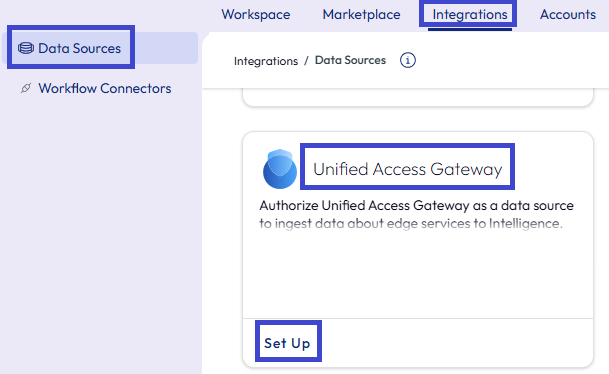
- Select Get Started in the modal.
- Expand the Download Credential menu item and read through the instructions.
- Select Download Credential and use the downloaded file to complete the setup in the Unified Access Gateway Admin console. Save the credentials file for use later if you upgrade the UAG.
Deauthorizing the UAG
Decouple the UAG from Intelligence using the Deauthorize menu option.
- In Intelligence, go to Integrations > Data Sources and find the Unified Access Gateway card.
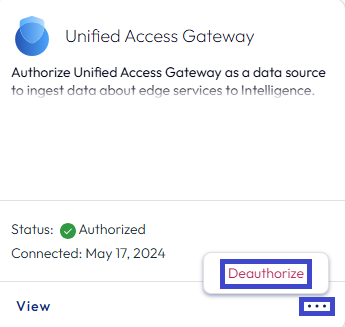
- Access the deauthorize menu option in several ways.
- Option 1: Select the ellipses on the card and select to Deauthorize the integration.
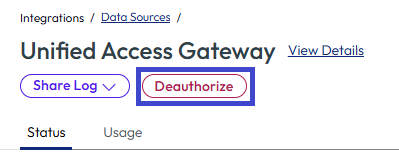
- Option 2: Select View on the Unified Access Gateway card and select the Deauthorize button on the Unified Access Gateway details page.
- Option 1: Select the ellipses on the card and select to Deauthorize the integration.
What if you need to upgrade the UAG?
After you upgrade the UAG, the integration system does not re-upload the credentials file to the Unified Access Gateway Admin console.
- If you saved the credentials file, you can re-upload the original credentials file to the Unified Access Gateway Admin console. Follow the UAG documentation.
- If you did not save the credentials file, you can take the listed steps.
- In Intelligence, deauthorize the current integration by following the Deauthorizing the UAG process on this page.
- Register the UAG in Intelligence by following Registering the UAG process on this page.
- Upload your new credentials file to the Unified Access Gateway Admin console by following the UAG documentation linked on this page.
Was this page helpful?