Integrate your Dell warranty information with the Omnissa Workspace ONE Experience Management solution in Omnissa Intelligence so you can generate reports, view dashboards, and run Freestyle workflows to help manage your Dell Technologies fleet of machines. Use a warranty management API that gives Workspace ONE the ability to pull in the status of service tag warranties, ship dates, and other manufacturer device information for your Workspace ONE enrolled devices.
Why integrate?
- Generate reports in Intelligence to understand how many assets with active warranties have open tickets, which becomes particularly helpful in detecting defective items.
- Create a dashboard to monitor Dell’s warranties so that you know how many devices are still covered.
- Set up automation alerts to be notified when contracts are about to expire. Workflow alerts give you time to evaluate the expenses and see if you can extend the warranty.
Request limits
The integrated system can send requests for up to 100 service tags.
Sync intervals
Dell warranty data syncs with the Experience Management solution immediately after you set up the integration. After the initial sync, the systems sync data every Sunday.
Requirements
You must use the listed solutions to use this integration.
- Use the Experience Management solution.
- Manage your devices with Omnissa Workspace ONE UEM.
- Have a Dell TechDirect account where you have permissions to request API keys.
- Register all your devices under one Dell TechDirect account and generate application keys for the same account so that Experience Management can access the warranty information for all devices.
Request an API key from TechDirect
You need to request an API key from Dell's TechDirect site because this key contains two values. You need the API key's Client ID and the Client Secret (Secret Key in Intelligence).
- The Experience Management system uses the Client ID and the Client Secret values to call the Dell API to pull warranty details.
- Associate the API key request to the Warranty project.
- After TechDirect approves your request, get the Client ID and the Client Secret for your project by expanding the project row on the Manage API Keys page in TechDirect.
- Copy the Client ID and the Client Secret values so that you can enter them in Intelligence.
Dell documentation
Find Dell documentation for requesting API keys.
- Go to Dell Technologies Support Documentation to find out how to request API keys.
- You can also access the Dell documentation PDF Get the PC Insights you need with PC Management APIs enabled by SupportAssist for directions on how to request an API key.
Integrate Dell
Use the Data Sources > Dell tile to enter your client ID and your key secret in to Intelligence so that Experience Management can display warranty details in dashboards, reports, and workflows.
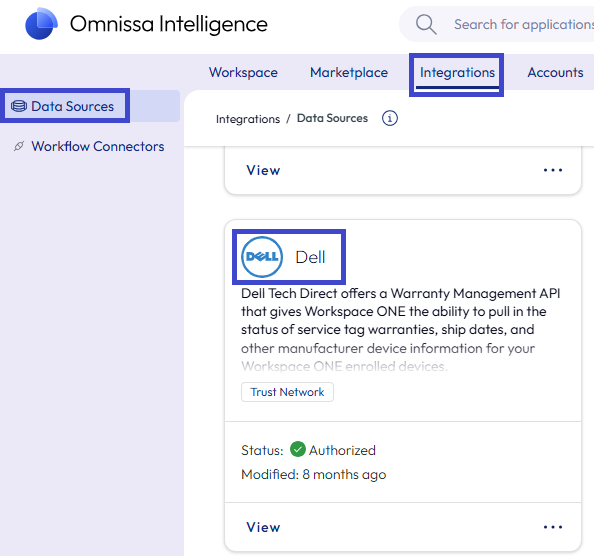
- In Intelligence, go to Integrations > Data Sources and find the Dell tile.
- Select Set Up on the Dell tile.
- Go to the Credentials tab and enter the Client Id and the Secret Key copied from TechDirect.
- Select Authorize.
You can now use Dell warranty information in your dashboards, reports, and workflows.
Manage the Dell integration
Use the Data Sources > Dell tile to manage the integration in Intelligence.
- In Intelligence, go to Integrations > Data Sources and find the Dell tile.
- Select View, Edit, or Deauthorize on the Dell tile.
- View: From the Dell details page, you can see information about Status and Usage for the integration. You can also access log files from this details page.
- Edit: Use this menu option if you need to update the Client ID or the Secret Key.
- Deauthorize: Use this menu option when you no longer want to use this integration and you do not want your warranty information displayed in Intelligence.
Marketplace templates
Use report templates found in the Marketplace to get started using your Dell warranty information in Intelligence.
- Go to Marketplace > Templates > Reports.
- Search for Dell.
- Add the Dell Tech Direct Warranty Information to your workspace.
Data definitions
Find definitions for the data points used in this feature in the Warranty Management topic.
Was this page helpful?